How to Read a Kavach Strip Chart
This post is a reference guide to the strip-chart diagrams on our site, showing how each lane, glyph, step line, and crash marker maps to a Kavach journal.
Before I introduce the strip charts on our blog, let me tell you who I am and where this started. I have worked in financial industry for about half-a-decade, and when I recently build HFT infrastructure from scratch, we had to read sequence timelines without getting lost in text logs. While building that, I found certain patterns that are helpful for me, and also helpful for agents, to debug faster, to reproduce the issue, and to verify the fixes.
A journal strip chart12 is about drawing the events which cause transitions in your state machine. What is a strip chart, you may ask? A strip chart is a software's visual tape which determines what inputs, reads, and outputs took place in each step.
Why does a strip chart spark curiosity and help to debug a bug faster? Whenever we are stuck reproducing what happened by looking at the logs, the network packets, or different containers, a simple strip chart lays out in bare bones the events that took place, which caused the software to end up in the state that it did. Let's say you have a bank account. Your bank account is a summation of all the credits and debits of your money. Now imagine one day you go up to your bank, and it says that you have 10 dollars. When you checked last night, you had 100k. So you will demand the transaction ledger for this, right? You are not ready to accept a guess from a log line when you can inspect the tape.
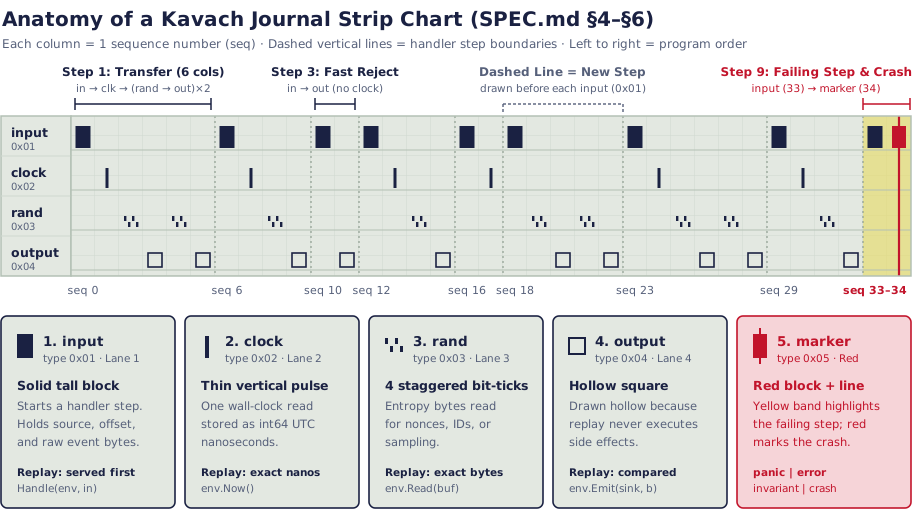
A Kavach strip chart is kind of like that. It has a transactional ledger which keeps account of all the state changes, all the state mutations that lead up to the crash. In a way, it makes the execution of an application auditable on every step.
Now, since I have worked in the finance industry, I see its applications everywhere. It helps to reproduce bugs, to actually see what events preceded the crash happening, and so on.
| Visual Element | Lane / Position | Record Type (journal/record.go) |
SDK Call | Meaning & Replay Semantics (SPEC.md §4–§6) |
|---|---|---|---|---|
| Vertical grid column | Left → right (seq) |
Every Record (u64 seq) |
— | One monotonically increasing sequence number (seq). Records appear in strict program order. |
| Dashed vertical line | Full height | Before each 0x01 input |
Handle(env, in) |
Step boundary. Everything between two dashed lines happened inside one single-writer handler step. |
Solid tall block (■) |
Lane 1 (Top) | 0x01 · TypeInput |
in kavach.Input |
Upstream event. Holds source (e.g. "kafka:wallet-events"), position ("3:1042"), and raw data. Served to start the step. |
Thin vertical tick (│) |
Lane 2 | 0x02 · TypeClock |
env.Now() |
Clock read. Holds unix_nanos (int64 UTC nanoseconds). Replay serves this exact timestamp back to the handler. |
4 staggered bars ('' ,,) |
Lane 3 | 0x03 · TypeRand |
env.Read(buf) |
Random read. Holds raw entropy data bytes (e.g. an 8-byte transaction nonce). Replay serves the exact recorded bytes. |
Hollow square (□) |
Lane 4 (Bottom) | 0x04 · TypeOutput |
env.Emit(sink, b) |
Emitted side effect. Drawn hollow because replay never executes outputs; it captures the handler's emission and compares it against this slot. |
| Yellow highlight band | Last step | Last input → marker |
— | The failing step. Highlights the entire step whose input triggered the failure (SPEC.md §6). |
| Red block + vertical line | Top lane + full height | 0x05 · TypeMarker |
Runtime / recorder | Failure annotation. Marks a panic, error, invariant, or crash that caused kavach-recorder to cut and flush the .kavach fixture. |
Why the shapes inside a step matter#
Starting from a snapshot, if you keep reading the events that are in the journal, each column shows what happened in that step. That's the ultimate goal for our reference diagram34. What makes it interesting are the shapes sprinkled across the lanes. A solid block comes from an input. A thin tick can come from the clock. Four bars can come from the fact that we are reading random bytes before emitting a hollow box.
Having the ability to read deterministically what happened in production from these four lanes is one of the key guarantees of our journal format, and that is what makes the diagram so useful.
func (l *Ledger) Handle(env kavach.Env, in kavach.Input) error {
	var ev Event
	if err := json.Unmarshal(in.Data, &ev); err != nil {
		return fmt.Errorf("decode event at %s: %w", in.Position, err)
	}
	amount := *ev.Amount
	if amount <= 0 {
		return reject(env, ev, "amount must be positive")
	}
	at := env.Now() // records 'clock' (0x02) in Lane 2

	switch ev.Type {
	case "deposit":
		l.Net += amount
		return l.post(env, ev, ev.Account, amount, at) // 1x (rand + output)
	case "transfer":
		if l.Balances[ev.Account] < amount {
			return reject(env, ev, "insufficient funds") // clock + output (no rand)
		}
		if err := l.post(env, ev, ev.Account, -amount, at); err != nil {
			return err
		}
		return l.post(env, ev.To, amount, at) // 2x (rand + output)
	}
	return nil
}
Challenges of reading production traces#
These challenges all come down to seeing what happened inside a step. Reading a production trace has several such traps.
Two-leg transfers and single deposits. Can a text log show everything? Show every branch? How does it know when a step is a transfer? Which helper ran twice? If these reads aren't drawn on the tape, the same transfer looks just like a deposit in the logs. As a company, Kavach Labs is going to tackle these challenges so that any trace is easy to read.
Early rejections and silent steps. Software often checks inputs in more than one place. Say you design a service that rejects a bad amount before reading the clock. How do you see that without stepping through a debugger? With 1,000 requests it may look fine, but on an early rejection you are skipping the clock and random reads altogether.
The yellow band and red crash marker. One system requirement for a crash fixture is that your failing step should stand out right away. Most single-threaded deterministic software follows this step order, but quite a few log viewers still don't. How do you model those? These are the uncomfortable parts of the system that we want to tackle.
| Step | Columns (seq) |
Records in Step (0x01–0x05) |
Cols | What Happened in the Handler |
|---|---|---|---|---|
| Step 1 | seq 0..5 |
input → clock → rand → output → rand → output |
6 | Two-leg operation (e.g. transfer): 1 clock read, 2 nonce reads + 2 emitted entries. |
| Step 2 | seq 6..9 |
input → clock → rand → output |
4 | Single-leg operation (e.g. deposit or withdraw): 1 clock read, 1 nonce read, 1 output. |
| Step 3 | seq 10..11 |
input → output |
2 | Fast validation rejection emitted before env.Now() or env.Read(). |
| Step 4 | seq 12..15 |
input → clock → rand → output |
4 | Single-leg operation: 1 clock read, 1 nonce read, 1 output. |
| Step 5 | seq 16..17 |
input → clock |
2 | Silent no-op step: read the clock, emitted no output. |
| Step 6 | seq 18..22 |
input → rand → output → rand → output |
5 | Clockless two-emission step: 2 random reads and 2 outputs without calling env.Now(). |
| Step 7 | seq 23..28 |
input → clock → rand → output → rand → output |
6 | Two-leg operation: 1 clock read, 2 nonce reads + 2 emitted entries. |
| Step 8 | seq 29..32 |
input → clock → rand → output |
4 | Single-leg operation: 1 clock read, 1 nonce read, 1 output. |
| Step 9 | seq 33..34 |
input → marker (shaded yellow + red line) |
2 | Failing step: panics immediately after input before reaching env.Now(). |
We're building Kavach Labs to tackle this problem head-on. We love deterministic verification as an architectural concept, and we want agentic software to be written and deployed so that it's easy to read a journal tape, replay the crash, fix the code, and deploy the fix with more confidence.
References
- SpecKavach Journal Format Specification (v0, §3–§6)github.com↩
- Codejournal/record.go — Record Type Codes and Payload Framinggithub.com↩
- Codeexamples/ledger/sdk/ledger.go — Single-Writer Wallet Handlergithub.com↩
- Codenull-amount.kavach — 34-Record Crash Fixturegithub.com↩